Accounting Software for Freelancers: How to Choose the Right Tool and Stay on Top of Your Money

Many freelancers love the work but hate the money side. Invoices get lost in email, expenses live in a shoe box, and tax time feels like a surprise test. The good news is that the right accounting software for freelancers can fix most of this in a single afternoon.
Accounting software helps you send invoices, track what you earn and spend, and see how much you really make. You do not need to be good with numbers. You only need a simple tool and a simple habit.
This guide explains what to look for, compares five popular choices, and shows you how to set everything up without stress.
In this guide you’ll learn:
• What accounting software does and whether you need it
• A five point check to pick the right tool
• How five popular options compare
• How to set up your software in seven simple steps
• What records to keep and a weekly money routine
What Is Accounting Software for Freelancers and Do You Need It?
Accounting software for freelancers is a tool that helps you track income, expenses and invoices in one place. If you are still deciding on your path, start with our main plan on how to become a freelancer, then come back here when your first client says yes.
What does it actually do?
Most tools let you create and send invoices, record expenses, connect to your bank account and see simple reports such as profit and loss. Some also remind clients to pay and help you prepare for tax time.
Spreadsheet or software?
A spreadsheet works fine for your first few clients. But it takes manual work, and small mistakes are easy to make. Software saves time, keeps everything in one place and can chase late payments for you.
Signs you need software

You may need it if you lose track of invoices, forget to record expenses, feel stressed at tax time, or have more than a few clients. Any one of these is a good reason to switch.
What to Look for in Accounting Software for Freelancers
Whether you write, design or code, the basic needs are the same. If you are starting as a writer, our guide on how to become a freelance writer shows how to price your work, which is the first thing your software will track.
The Five Point Freelancer Check
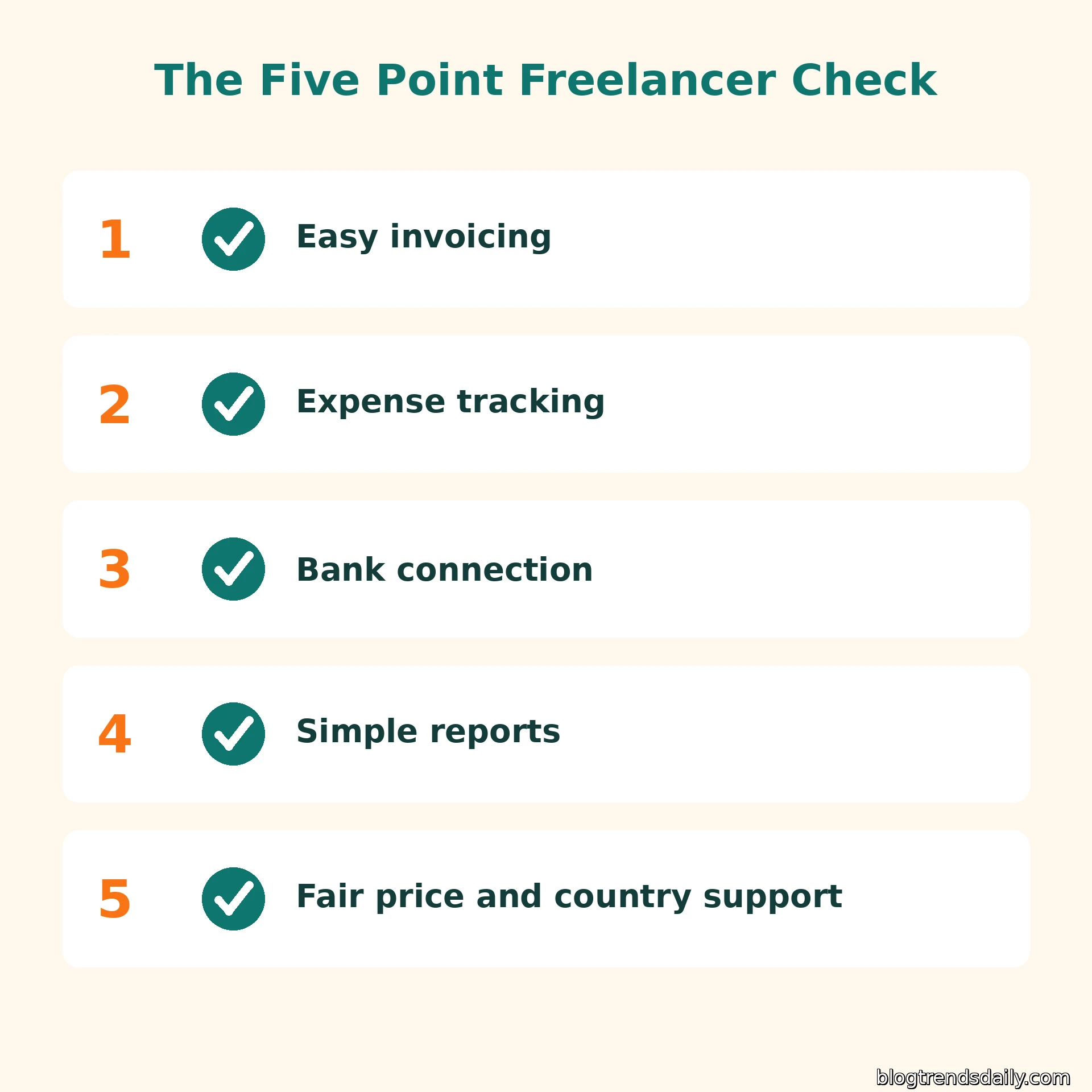 Here is a simple idea we call The Five Point Freelancer Check. Before you pick a tool, make sure it passes these five tests.
- Easy invoicing. You should be able to create and send a clean invoice in a few minutes.
- Expense tracking. It should let you add expenses quickly, ideally with a photo of the receipt.
- Bank connection. Linking your bank saves typing and reduces mistakes.
- Simple reports. You want clear profit and loss numbers, not a wall of accounting terms.
- Fair price and country support. Check that the tool works in your country and currency, and that you can afford the paid plan if you need it.
Free or paid?
Free plans usually cover the basics, such as invoices and expense tracking. Paid plans add extras like more clients, automation and deeper reports. If you earn little right now, start free. Upgrade only when you feel the limits.
Best Accounting Software for Freelancers Compared
Freelancers in high paying fields, such as those in our list of the most lucrative freelance jobs, often handle bigger invoices and more clients, so good software pays for itself quickly. Here are five popular options.
Accounting software for freelancers at a glance
| Software | Key feature | Best for | Cost level | Ease for beginners |
| Wave | Free plan for core accounting and invoicing | Beginners on a tight budget | Free to low | High |
| Zoho Books | Free plan for small businesses, strong automation | Value seekers and Zoho users | Free to low | Medium |
| FreshBooks | Invoicing and time tracking built for service work | Freelancers with many clients | Medium | High |
| Xero | Strong reports and multi currency | Growing freelancers and international clients | Medium | Medium |
| QuickBooks | Well known, works well with accountants | Freelancers who work with an accountant | Medium to higher | Medium |
Plans and prices change often, so always check each tool’s official pricing page before you pay. Also check that the tool supports your country and currency.
Quick notes on each tool
Wave is a popular choice for beginners because its core accounting and invoicing start free. Some extras are paid, and some features depend on your country.
Zoho Books offers a free plan for small businesses under a set revenue limit, so check the current limit on its site. It is strong on automation and works best if you already use other Zoho apps.
FreshBooks is built around invoicing, time tracking and client reminders, which suits freelancers who bill many clients. It usually costs more than the free options.
Xero is a good fit if you expect to grow or work with clients in other countries. It has more features, so there is a bit more to learn.
QuickBooks is one of the best known names and works well when you share your books with an accountant. It can feel heavy for beginners and often costs more.
Our pick
 For most beginners, start with a free option such as Wave or Zoho Books. If invoicing and client reminders are your biggest need, FreshBooks is worth a look. If you plan to grow, compare Xero and QuickBooks.
How to Set Up Accounting Software in Seven Simple Steps
Setting up takes about an hour. Follow these steps in order.
- Choose a tool using the Five Point Freelancer Check.
- Add your business name, logo and currency.
- Connect your bank account, or import your recent transactions.
- Add your clients and their contact details.
- Create an invoice template with your payment terms.
- Set up expense categories, such as software, internet, equipment and travel.
- Plan to review everything once a week.
A simple example
Imagine Sara, a freelance designer. After one month of using her software, she sees that one client pays 20 days late every time. She sets a firm payment date and an automatic reminder. This is only an example, but it shows how simple numbers lead to smarter choices.
Common mistakes to avoid
Do not mix personal and business money. Do not throw away receipts. Do not wait until tax time to record expenses. And do not forget to keep a backup of your records.
Records, Taxes and the Friday Money Routine
Good records matter in almost every country. The IRS recordkeeping page explains that you can choose any recordkeeping system that clearly shows your income and expenses. The GOV.UK guide to business records explains what self employed people in the UK must keep and for how long.
What records to keep
Keep your invoices, receipts, bank statements, contracts and a list of your business expenses. Software makes this easy because most of it is stored in one place.
The Friday Money Routine
 Here is a simple habit we call The Friday Money Routine. Spend 20 minutes every Friday to do four things: send reminders for late invoices, record new expenses, check your balance, and set aside money for taxes. It is short, but it keeps your books clean all year.
Ask a local expert
Tax rules are different in every country. If you are unsure, ask a local accountant or your government tax office.
Pro Tip: Open a separate bank account for your freelance income. It makes your records cleaner and your tax time much easier.
FAQ
Best accounting software for freelancers?
It is contingent upon what you need. Wave and Zoho Books are popular free solutions for starters. FreshBooks is good if you do a lot of invoicing, while Xero or QuickBooks are better for developing freelancers. Use the Five Point Freelancer Check to determine.
Any free accounting software for freelancers?
Yes. Tools like Wave and Zoho Books include free plans for basic accounting and invoicing, however limits and features may vary. Before signing up, you should check the official page of each tool and if it is supported in your country.
Does a freelancer need accounting software?
Not on the first day, but it helps soon. A spreadsheet is fine for a few clients. Once you have regular clientele, software saves you time, lowers errors and makes tax time a breeze.
Can I use a spreadsheet instead of accounting software?
Yes, at the beginning. columns for date, customer, expense and amount. Risk of manual mistakes and no automatic warning. If you find it taking too long, switch to software.
How much is accounting software for freelancers?
They range in price from free to monthly fees that increase with additional services and clients. Plans fluctuate quite a lot, so do check the official pricing page of each instrument before deciding.
What is the easiest accounting program for beginners?
Wave and FreshBooks are sometimes referred to as ‘beginner friendly’ because they have simple displays. The only way to know for sure is to try a free plan or a trial and submit one test invoice.
Can accounting software assist with taxes?
Yes. It records your income and expenditure, which is what you need when you fill in your tax return. It is not a substitute for a tax professional so verify your local rules or get guidance if you are not sure.
Metrics to Track Monthly by Freelancers
Track income, invoices you’ve received and paid, business costs and money you’ve put aside for taxes. Use The Friday Money Routine to go over them weekly and prevent things from building up.
Conclusion
The right accounting software for freelancers makes money feel simple. Use The Five Point Freelancer Check to pick a tool, set it up in about an hour, and build the habit of a short Friday review.
You do not need the fanciest tool. You only need one that you will actually use every week.
Next Steps:
• Run the Five Point Freelancer Check on two tools
• Send one test invoice from your chosen software
• Read our guides on how to become a freelancer, how to become a freelance writer and the most lucrative freelance jobs

Daniel Whitmore is the founder and main writer of blogtrendsdaily.com. With five years of experience writing and publishing online content, Daniel started the blog to give readers clear, honest and easy to follow guides on education, careers, health, technology, travel, fashion, beauty and fitness, automotive and trending topics.



Post Comment